Building a Style Guide
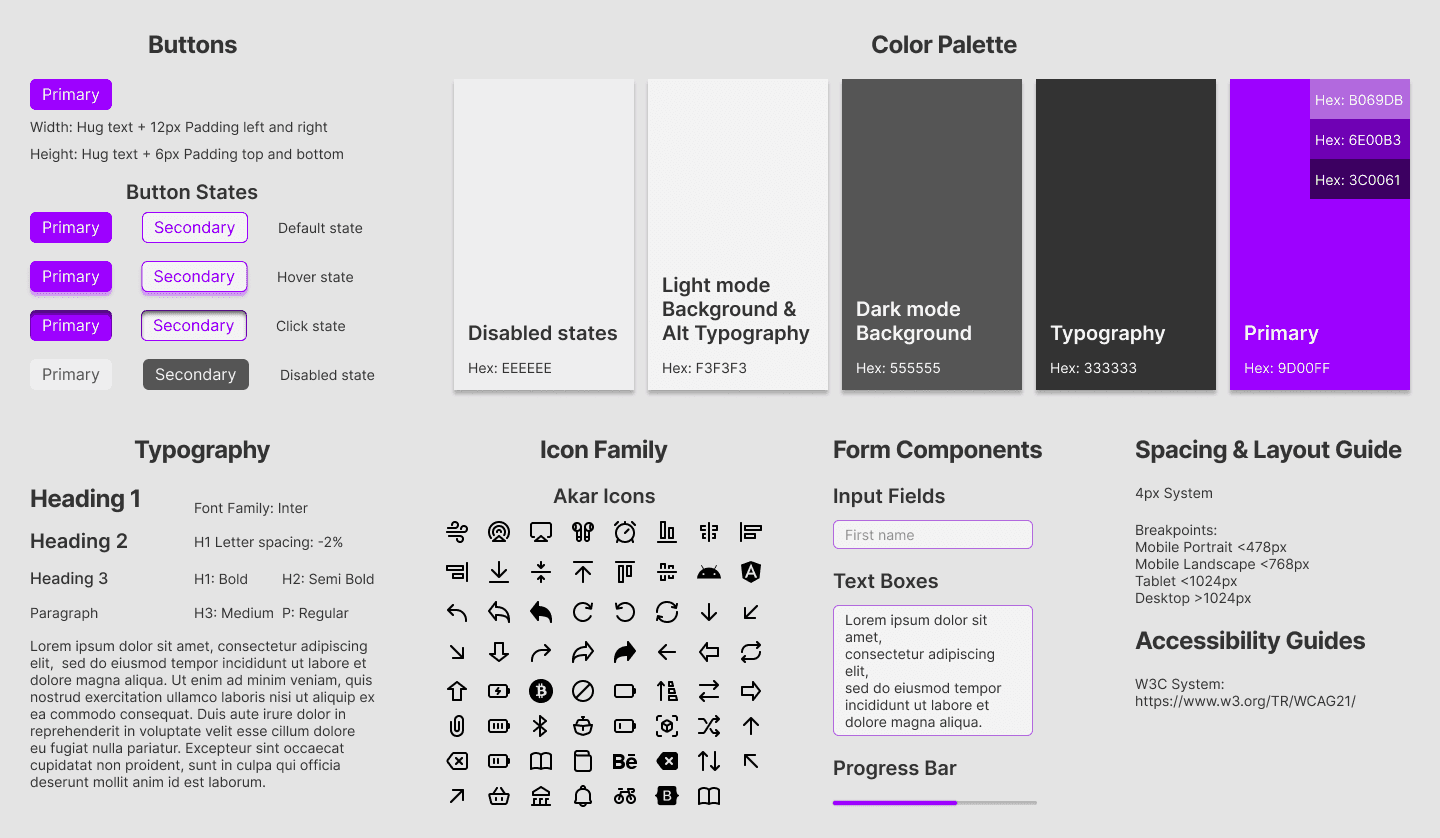
This sample style guide demonstrates my ability to create a cohesive, scalable visual system for a modern web application, ensuring consistency across design and development.
Why this is included
This style guide is included to demonstrate how I think beyond individual screens and focus on building scalable, consistent systems. Strong visual design is important, but long-term product success depends on structure, clarity, and repeatability.
By documenting typography, color, components, spacing, and interaction states, I ensure that both design and development teams can work efficiently while maintaining a cohesive user experience.
My Approach to Building the Style Guide
Establishing Foundations: I began by defining the core brand elements — typography hierarchy, color palette, spacing system, and visual tone. These foundational decisions set the direction for the entire interface and ensured consistency before moving into components.
Rather than designing screens first and systemizing later, I built the foundations early to prevent visual drift and inconsistencies.
Component-First Thinking: Once the core elements were defined, I moved into building reusable UI components such as buttons, inputs, cards, and navigation elements.
Each component was designed with:
Multiple states (default, hover, active, disabled, error)
Clear spacing rules
Defined border radius and elevation
Accessibility considerations
This approach ensured components could scale across multiple pages without needing to be redesigned each time.
Scalability & Developer Alignment:
To support implementation, I organized styles using consistent naming conventions and clear usage guidelines.
Where possible, I aligned design decisions with practical development standards (spacing scale, color tokens, reusable components) to reduce ambiguity during handoff.
The goal was not just visual consistency, but operational efficiency.
How I Maintain the System:
A style guide is a living system, not a static document.
As new features are introduced, I:
Audit existing components before creating new ones
Expand patterns instead of duplicating elements
Refine documentation when edge cases arise
Ensure updates maintain visual and interaction consistency
This prevents UI fragmentation and keeps the product cohesive as it evolves.